To create a webhook, go to Integrations → Webhooks and click Create New Webhook in the top right corner.
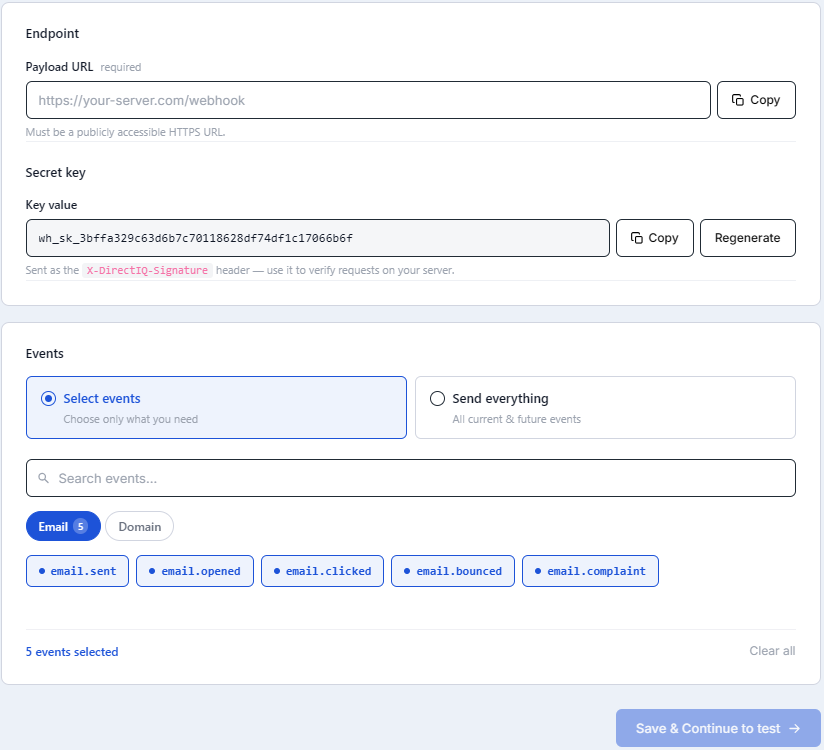
You will need to enter the following details:
Endpoint URL: The public URL where you want to receive webhook events
Events: Select which events should trigger the webhook
Email events:
email.sent,email.opened,email.bounced,email.complaintDomain events:
domain.unverified,domain.verifiedYou can select specific events or choose All Events to receive every available update
A Secret Key is automatically generated for each webhook. This key is used to verify the authenticity of incoming requests. If you regenerate the secret key, you must update it in your implementation to ensure signature validation continues to work correctly.
Once saved, the webhook becomes active immediately and will start sending events to your configured endpoint.
See Also: